
Sponsored
Nairobi, Nairobi Central, 2 hours ago
14 views
Epson Ink Pad End of Life Replacement Service
Printing and service
Company Name
Business
Type of Service
Other
Specialization
Store address
Nairobi • Nairobi Central
Moi Avenue Rahimtullah Trust Building Main 2nd floor shop GF 11 ACETECH PRO
Open now
• Mon - Sat, 08:00-18:00
Nairobi • Nairobi Central
Trust Building 2nd floor
Open now
• Mon - Sat, 08:00-18:00
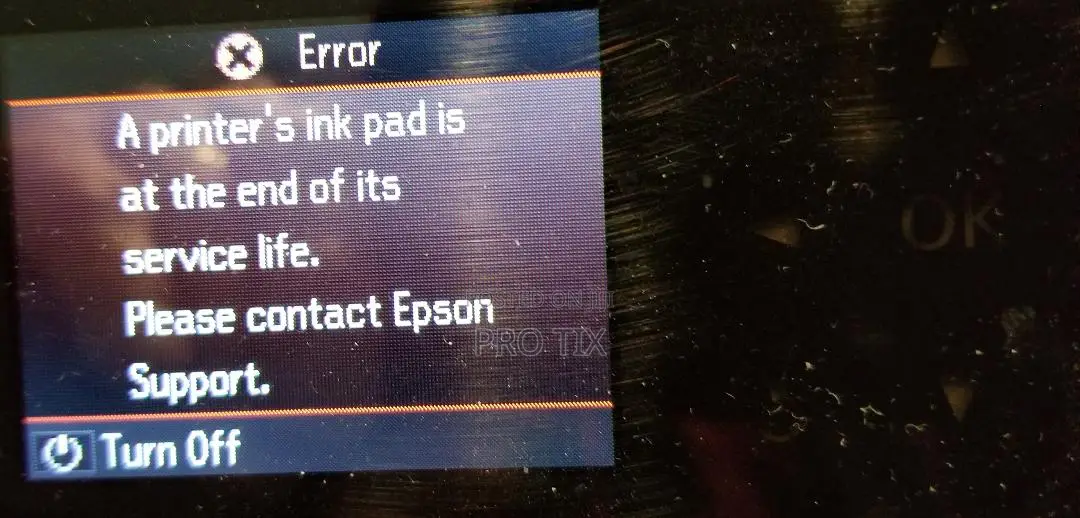
The Epson ink pad end of life error appears when the printer’s internal waste ink pad is full or has reached the manufacturer’s estimated service limit. This pad collects excess ink during cleaning cycles, deep cleaning, ink flushing, and normal printing.
When the counter reaches its limit, the printer may stop working and display messages such as:
Epson ink pad is at the end of its service life
Service required
A printer’s ink pad is nearing the end of its service life
Waste ink pad full
Epson printer not printing due to ink pad error
To fix this issue properly, the waste ink pad should be replaced or serviced, and the printer’s waste ink counter should be reset after maintenance. Resetting without checking or replacing the pad may cause ink leakage later.
Key Service Features
Epson waste ink pad replacement
Ink pad counter reset

Safety tips
- Check Feedback to make sure the person is reliable
- Agree on the scope of work and remuneration
- Meet in person at a safe public place


