
Frequently Asked Questions
How do I place a Safe Deal order?
You create the order from an ad with Safe Deal. The seller then accepts or declines it.
- Before ordering, we recommend checking the item details and availability with the seller in Jiji Chat.
- Select Buy with Safe Deal on the ad. If the Talked to the seller yet? popup appears, select Check delivery fee to continue to checkout. You can also use Call seller to contact the seller first.
- Enter your location, delivery address, name and phone number. Check them carefully so the seller can arrange delivery.
- Review the item price, delivery fee, any payment fee and the total.
- Pay using an option shown in the Jiji checkout. Open Safe Deal in your profile to follow the order.
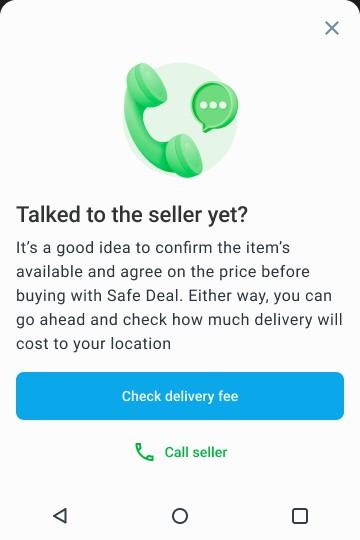
If this popup appears, select Check delivery fee to continue. Contacting the seller first is recommended, but you can continue without calling.
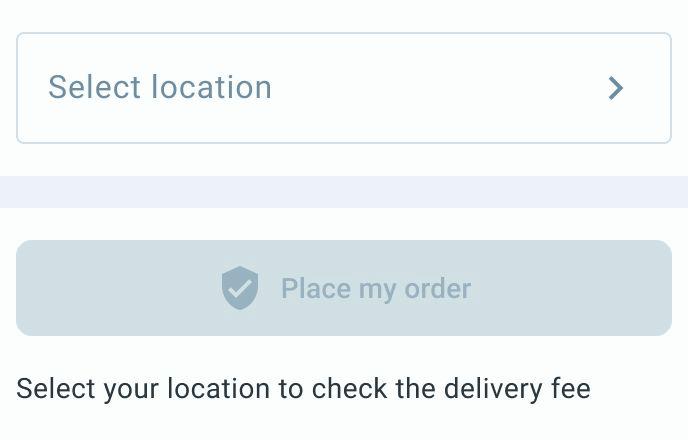
Select your delivery location, then complete the delivery details shown at checkout.
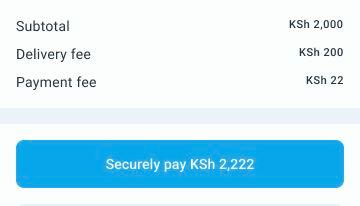
Example amounts. Check the fees and total shown in your order before paying.
If you leave checkout before completing payment, open Safe Deal in your Jiji profile and select the unpaid order to continue using the payment action shown. Check its payment deadline. If you have already been charged, email support@jiji.co.ke with the order number and payment receipt before trying again.
If the seller declines or does not accept before the confirmation deadline, the paid order is cancelled and refunded.
Never send the payment directly to the seller. See how to track your order.
